
Change Color of Image Online Instantly
Upload an image and replace any color in seconds.
Free online image color changer for PNG, JPG, and SVG files.
Why Use Our Image Color Changer?
- Replace any color in an image instantly
- Works with PNG, JPG, and SVG images
- Smart color detection with precision control
- No Photoshop or design skills required
- 100% free and no signup required
- Download high-quality recolored images
How to Change the Color of an Image
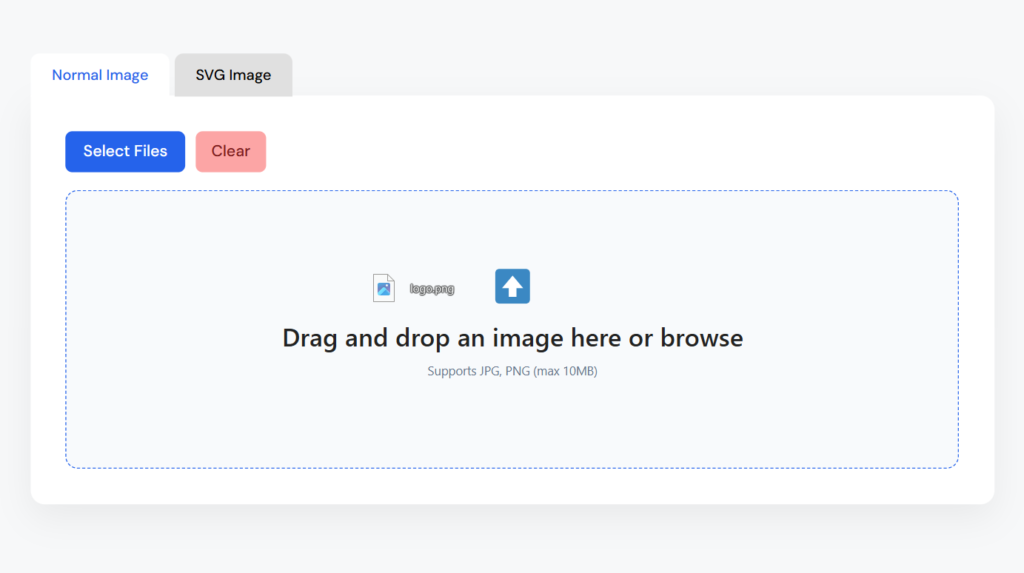
1
Upload Your Image
Upload your image by dragging and dropping it into the tool or clicking the upload button. The tool supports PNG, JPG, and SVG formats.
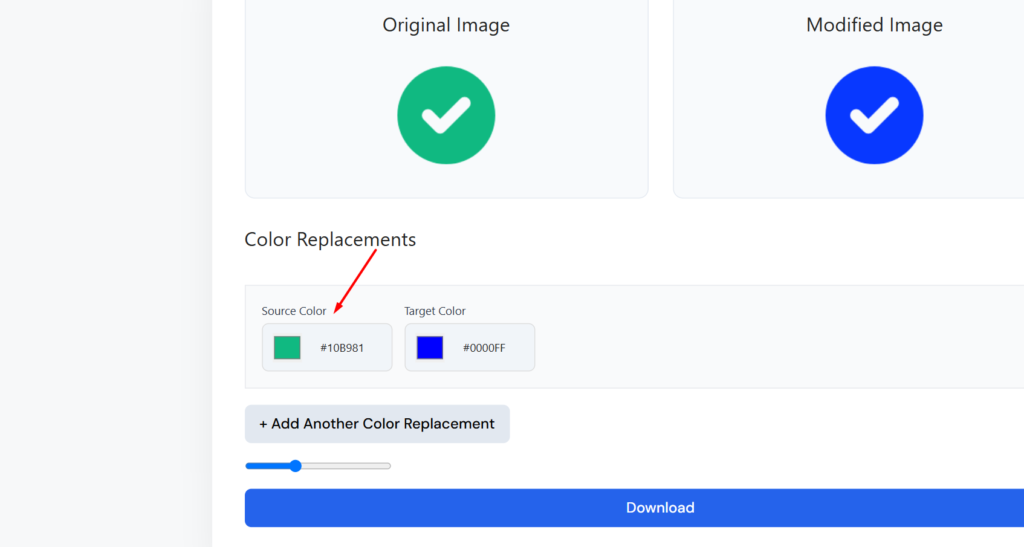
2
Select the Color
Use the color picker to select the color in the image that you want to change. The tool automatically detects similar shades for accurate color replacement.
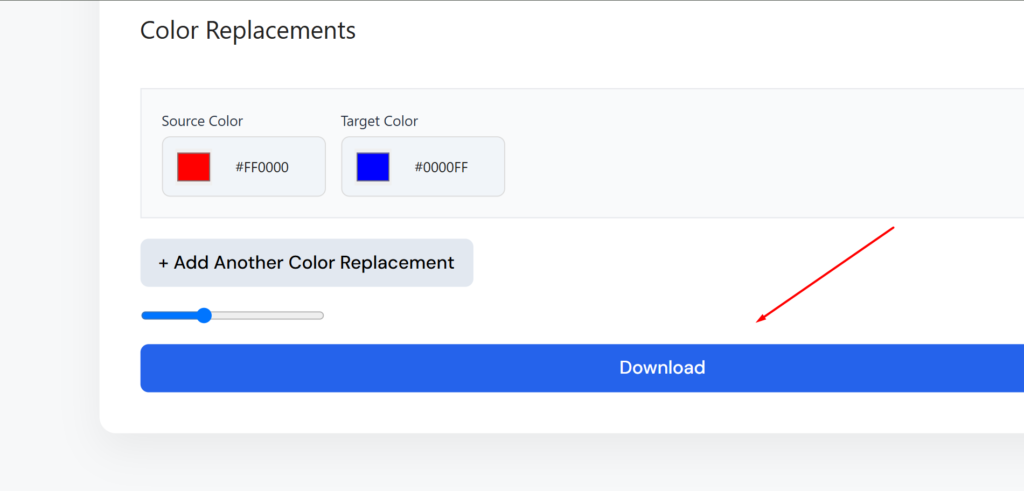
3
Download Result
Choose the new color and preview the result instantly. When you’re satisfied, download the updated image in high quality.
Powerful Online Image Color Replacement Tool

Precise Color Replacement

Works with Transparent PNG
SVG Color Editing
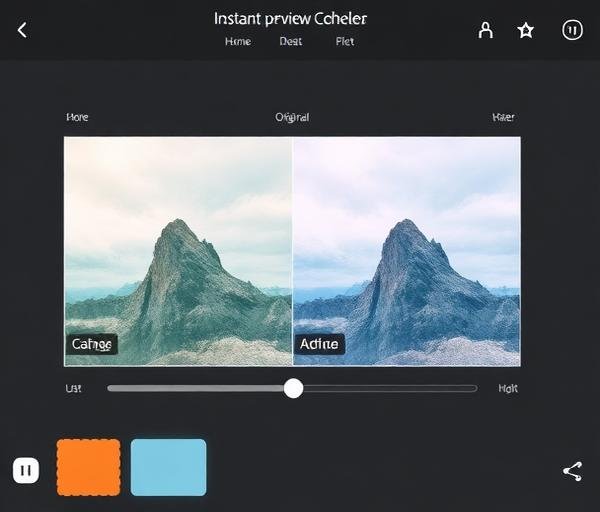
Instant Preview
See the Image Color Change in Action

Change the Color of Any Image Online
What Is Image Color Replacement?
Image color replacement is the process of identifying a specific color within an image and swapping it with a different color. This technique is widely used in graphic design, branding, product photography, and digital art. Unlike traditional photo editing, which requires complex software like Photoshop or GIMP, online color replacement tools simplify the process by automating color detection and substitution. With just a few clicks, users can transform the appearance of logos, icons, product images, and more — without any technical skills or software installations.
Why Designers Change Colors in Images
Designers frequently need to change colors in images for a variety of reasons. Brand consistency is one of the most common — when a company updates its brand colors, every logo, icon, and marketing asset needs to reflect the change. Product teams use color replacement to create multiple color variations of a single product image for e-commerce listings, saving time and reducing photography costs. Designers also change colors to test visual concepts, create mockups, adapt assets for different campaigns, or ensure accessibility by improving contrast ratios. Color replacement is an essential skill in any designer’s workflow.
How Color Replacement Works
Color replacement works by analyzing the pixel data of an image and identifying pixels that match a target color. The tool uses a tolerance or threshold setting to determine how closely a pixel must match the target color to be included in the replacement. This allows the tool to handle gradients, shadows, and anti-aliased edges gracefully. For raster images like PNG and JPG, the replacement happens at the pixel level. For vector formats like SVG, the tool can directly modify fill and stroke color values in the markup, providing perfectly clean results. Advanced tools also support hue shifting, which preserves the tonal variations of the original color while changing its overall hue.
Benefits of Online Color Editing Tools
Online color editing tools offer several advantages over traditional desktop software. First, they require no installation — everything runs in your browser. This makes them accessible from any device, including tablets and Chromebooks. Second, they’re designed for simplicity, with intuitive interfaces that don’t require design expertise. Third, most online tools are free to use, making professional-quality color editing accessible to everyone. They also tend to produce results instantly, allowing for rapid iteration and experimentation. For teams, online tools enable easy collaboration and sharing without the need for expensive software licenses.
Change PNG, JPG, and SVG Colors Easily
Each image format has its own characteristics when it comes to color replacement. PNG files are ideal for graphics with transparency — you can change the color of a logo or icon while preserving its transparent background. JPG files are best for photographs, though color replacement in photos requires more careful tolerance settings due to the wide range of tones and gradients. SVG files offer the cleanest results because they use mathematical descriptions of shapes rather than pixels, allowing for exact color value changes without any quality loss. Our tool handles all three formats seamlessly, detecting the file type automatically and applying the optimal color replacement algorithm for each. Whether you’re working with a simple icon or a complex product photo, you’ll get professional results every time.
Frequently Asked Questions
How can I change the color of an image online?
Simply upload your image to our free tool, use the color picker to select the color you want to change, choose a new replacement color, and download the result. The entire process takes just seconds and works right in your browser.
Can I replace a specific color in an image?
Yes! Our tool uses smart color detection to identify and replace specific colors in your image. You can adjust the tolerance to control how precisely the color is matched, allowing you to target exact shades or broader color ranges.
Does this tool work with PNG images?
Absolutely. Our tool fully supports PNG images, including those with transparent backgrounds. You can change any color in a PNG file while preserving transparency and image quality.
Can I change SVG colors online?
Yes, our tool supports SVG color editing. It can modify fill and stroke colors in SVG files, providing clean and precise results since SVG is a vector format.
Is this image color changer free?
Yes, our image color changer is 100% free to use. There’s no signup required, no watermarks, and no usage limits. Simply upload your image and start changing colors.
Will image quality be reduced?
No. Our tool preserves the original quality of your image during the color replacement process. For raster images (PNG, JPG), the resolution and detail remain unchanged. For SVG files, the vector quality is maintained perfectly.
Lorem ipsum dolor sit amet, consectetur adipiscing elit. Ut elit tellus, luctus nec ullamcorper mattis, pulvinar dapibus leo.Lorem ipsum dolor sit amet, consectetur adipiscing elit. Ut elit tellus, luctus nec ullamcorper mattis, pulvinar dapibus leo.Lorem ipsum dolor sit amet, consectetur adipiscing elit. Ut elit tellus, luctus nec ullamcorper mattis, pulvinar dapibus leo.